How to deposit to Hyperliquid, and which chains work
Verified against Hyperliquid docs: How to start trading and Hyperliquid docs: USDC on HyperCore · by Hyperliquid Academy
The thing most guides get wrong
Nearly every walkthrough still says the same thing: bridge USDC to Arbitrum, then deposit. Arbitrum works and remains the most convenient route, but the deposit window now accepts considerably more than that.
USDC is accepted from Arbitrum, Ethereum, Base and Polygon.
Native assets are accepted directly from their own chains: BTC from Bitcoin, ETH and ENA from Ethereum, SOL and a handful of Solana tokens, MON from Monad, XPL from Plasma, AVAX from Avalanche, and ZEC from Zcash.
The distinction that matters is what happens on arrival. USDC lands ready to use as perpetuals collateral. Everything else lands as a spot holding, and you have to sell it for USDC or another quote asset before it can back a perpetual position.
Step by step, the USDC route
-
Get USDC on a supported chain
If you already hold USDC on a centralised exchange, withdrawing it to Arbitrum is usually the cheapest path. The exchange-to-Hyperliquid route is a page of its own, because Arbitrum carries two different tokens both called USDC and sending the wrong one costs you the transfer.
If your USDC is on another chain, Circle’s cross-chain transfer protocol moves it natively, and general-purpose bridges also work.
Keep a small amount of the chain’s gas token. You need it to send the deposit, and nothing more.
You should see a USDC balance plus a little of that chain's gas token in your wallet
-
Open the deposit window
Click Deposit in the app, then choose the asset and the chain. The window states the fee above the fields, and the button changes to tell you what it will do next: if your wallet is on another network it reads Switch to Arbitrum to Deposit rather than depositing straight away.
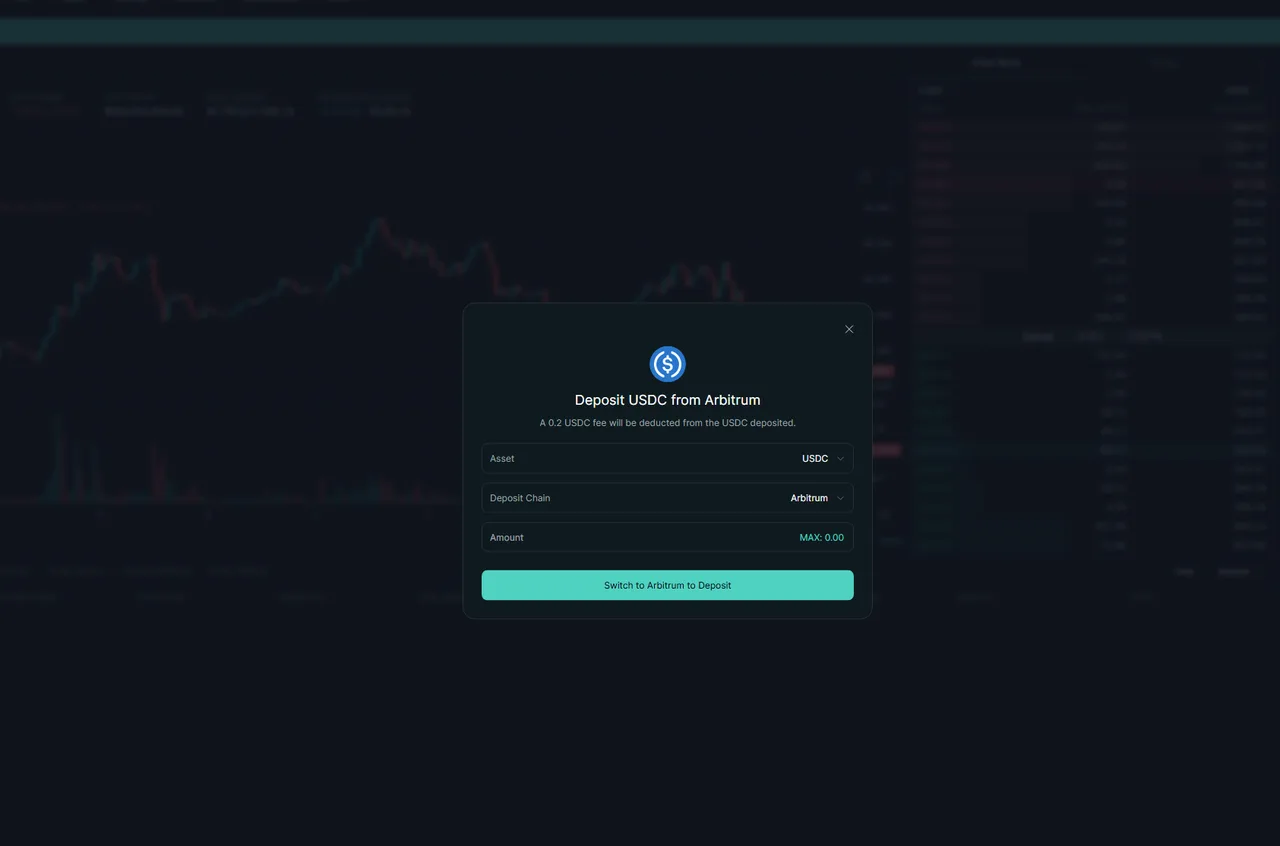
You should see an Asset selector, a Deposit Chain selector, an amount field and the fee stated above them
-
Send from your wallet or exchange
For USDC from a connected wallet, enter the amount and confirm in your wallet. For a transfer from a centralised exchange, paste the deposit address and pick the matching network.
Send a small test amount first if this is a new route for you. The cost of a test is a few cents of gas; the cost of a mistake is the whole transfer.
You should see a confirmed transaction on the source chain's explorer
-
Wait for it to arrive
Most routes take a few minutes. Native-asset deposits handled by Unit can take longer because they wait for confirmations on the source chain.
You should see the balance appearing in your Perps account
-
Move it where you need it
USDC on HyperCore can sit in your Perps balance or your Spot balance. Perpetual positions draw on the Perps balance. Transferring between the two is an in-app action, not a withdrawal, and costs nothing.
Whether those are two pools at all depends on your account mode: in unified account mode the balance in an asset already covers both, so there is nothing to move.
You should see collateral in the account you intend to trade from
What it costs
The deposit window states it plainly, and most guides omit it: 0.2 USDC is deducted from the amount you deposit on the standard route. That is on top of the gas you pay on the source chain, and it is a flat charge rather than a percentage.
Flat charges are regressive. On a $2,000 deposit it is a rounding error. On a $40 deposit it is half a percent before you have traded anything, which is more than the trading fee on the first several round trips. If you are starting small, deposit once rather than in instalments.
There is a second Arbitrum route in the chain selector, labelled Arbitrum (Legacy Bridge), which uses the older bridge contract.
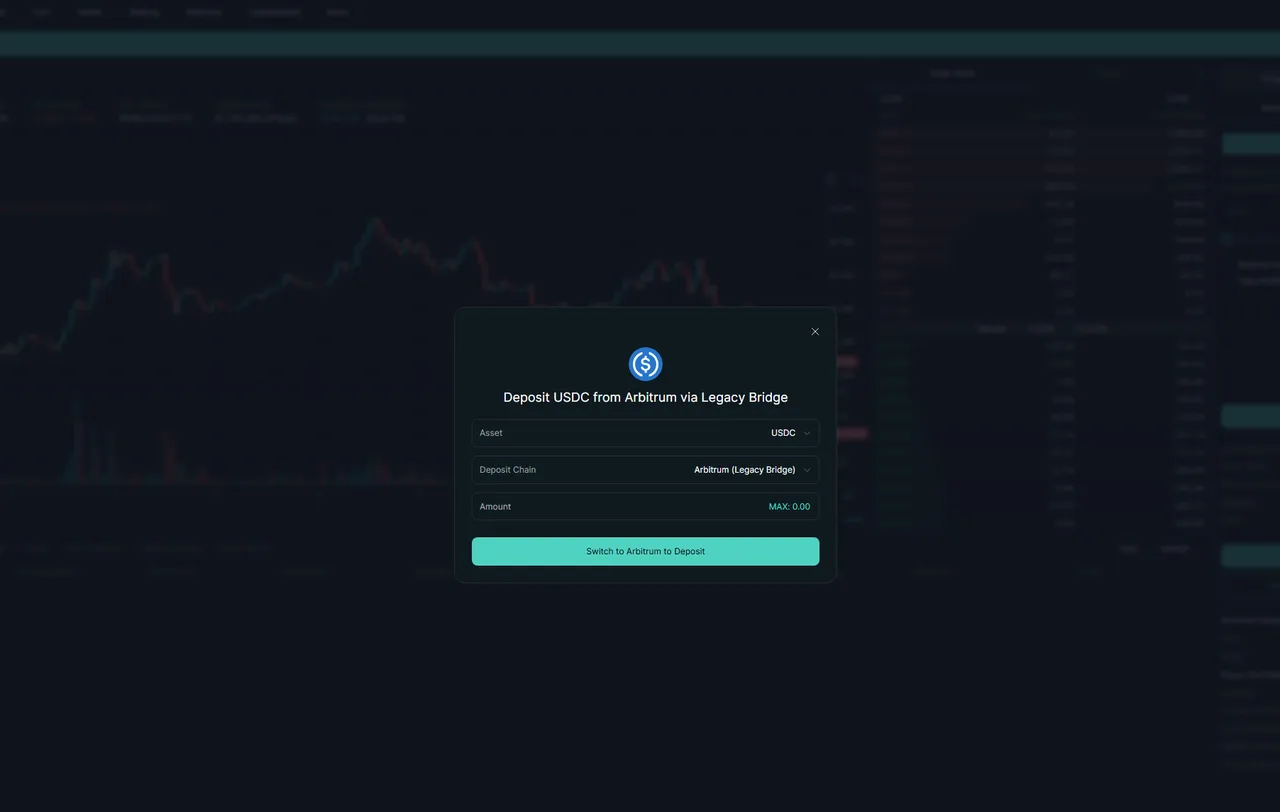
Use the standard route unless you have a specific reason not to. The legacy bridge exists for compatibility, and a route that is being kept alive for compatibility is not the one to pick by default.
What each route is good for
| Route | Typical speed | Cost | Best for |
|---|---|---|---|
| USDC from Arbitrum | Minutes | Low source-chain gas | Almost everyone |
| USDC from Ethereum | Minutes | Higher gas | You already hold USDC on Ethereum |
| USDC from Base or Polygon | Minutes | Low gas | Funds already on those chains |
| Native BTC, ETH, SOL and others | Longer, waits for confirmations | Source-chain fee | Moving an existing holding in without a separate swap |
| Cross-chain USDC transfer protocol | Minutes | Source-chain gas | USDC on a chain the window does not list |
Why your deposit might not appear
Work through these in order before contacting anyone.
Check the source chain explorer. If the transaction has not confirmed, nothing on Hyperliquid’s side is wrong yet.
Check you sent the right token. Several chains carry more than one asset called USDC. The bridged variants are different contracts and will not credit.
Check the right balance. A deposit can land in Spot when you were watching Perps. They are separate balances on the same account.
Check the chain you selected. The deposit address is chain-specific. Sending on a chain the window did not offer for that asset is the one failure mode that is genuinely hard to recover from.
Getting money back out
Withdrawals go through the same Withdraw button and settle to the chain you choose. Depending on the destination and method there may be a small gas cost to process it. Our withdrawal guide covers the sequence and the common hold-ups.
If you are funding from outside the usual routes, the country pages cover the practical path for the UK, Germany and Turkey.
Frequently asked questions
Which chains can I deposit USDC from?
Arbitrum, Ethereum, Base and Polygon. Arbitrum is the most common route because most exchanges support withdrawing USDC there cheaply, and Circle's cross-chain transfer protocol moves USDC in from other chains.
Is there a minimum deposit?
The documentation does not publish a fixed minimum. The practical floor is set by gas on your source chain and by the minimum order sizes once you start trading, so very small deposits are uneconomic rather than impossible.
Can I deposit Bitcoin directly?
Yes. Native BTC on the Bitcoin network is accepted and arrives as a spot balance, handled by Unit. To use it as perpetuals collateral you sell it for USDC first.
Why is my deposit not showing up?
The usual causes are sending on a chain that is not listed, sending a token that looks like USDC but is a different contract, or looking at the Spot balance when the funds arrived in Perps or the reverse. Check the transaction on the source chain's explorer first.
Do I pay a fee to deposit?
Yes, on the standard route: the deposit window states that 0.2 USDC is deducted from the amount deposited. That is separate from the gas you pay on the source chain. Trading itself is still gas-free, and the fee is flat rather than a percentage, so it matters most on small deposits.
Sources
- Hyperliquid docs: How to start tradinghyperliquid.gitbook.io
- Hyperliquid docs: USDC on HyperCorehyperliquid.gitbook.io
We link the primary source for every number on this page. If a figure here disagrees with the Hyperliquid documentation, the documentation is right and we want to know.